Every sale you make on e-SwapMeet goes straight to your balance. When you are ready to withdraw your earnings, you can request a payout directly from your Vendor Dashboard.
Table of Contents
How Earnings Work
e-SwapMeet charges zero commission on sales. The only platform fee is your $10 per month vendor subscription. Everything else you earn from a sale is yours.
After a customer completes a purchase, the sale amount is recorded in your Dokan vendor ledger. You can view your current balance anytime from your Vendor Dashboard under Earnings.
Withdrawal Minimum
You can request a withdrawal once your balance reaches $20 or more. Requests below that threshold are not available.
How to Withdraw Your Earnings
- Log in and go to your Vendor Dashboard.
- Click Withdraw in the left menu.
- Enter the amount you want to withdraw (must be at least $20).
- Select your preferred payment method.
- Submit the request.
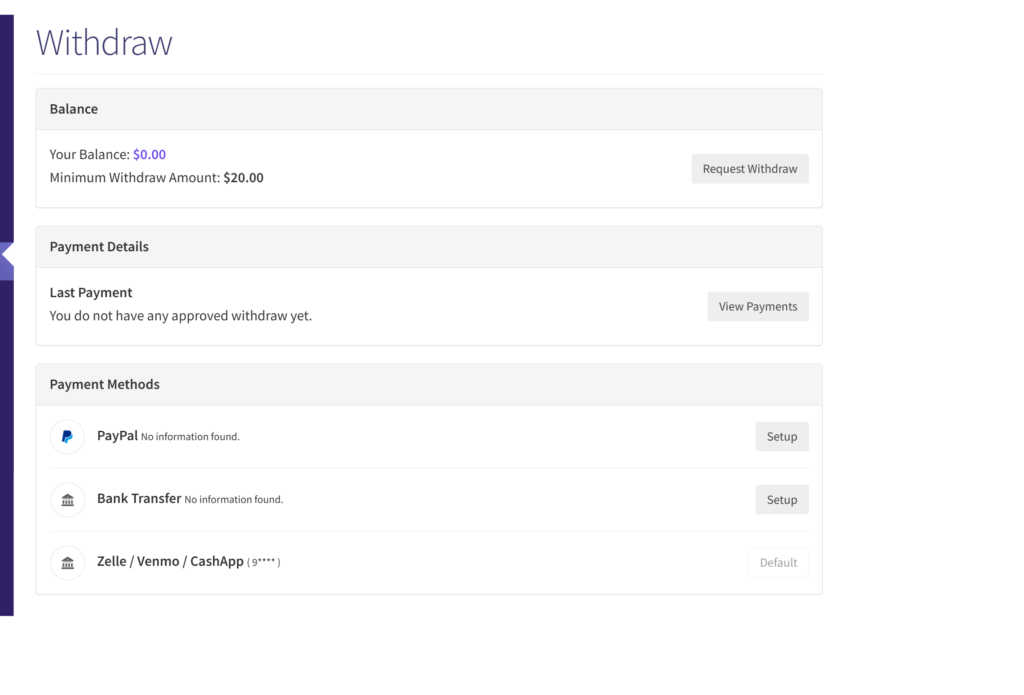
Once submitted, the request goes to the e-SwapMeet admin for review and approval. You will receive payment after it is approved and processed manually.
Available Payment Methods
When submitting a withdrawal request, you can choose from the following methods:
- PayPal (enter your PayPal email address)
- Bank transfer (enter your account details)
- Zelle, Venmo, or CashApp (enter your handle or phone number)
Make sure your payment details are entered correctly in your vendor profile before submitting a request. You can update them under Vendor Dashboard > Settings > Payment.
About the Disbursement Process
Disbursements are manual and admin-approved. Like most marketplace payment systems, the process protects both sides of the sale. There is no automatic payout schedule. Withdrawals are processed after review, and timing depends on when the admin approves the request.
This keeps the process flexible and personal, consistent with the swap meet spirit of e-SwapMeet.
Questions? Check the Sell on e-SwapMeet page for more details on the vendor experience, or contact our team directly.